GPU pools: one model across two devices
Development preview. A pool runs a supported GGUF model across the coordinator's accelerator and a trusted worker's GPU. The current validated configuration is an Apple Silicon Mac coordinator with one native Windows NVIDIA worker. Use Dyno Lab 0.3.0 or later.
Windows worker source and setup · Pool API and Python examples · Backend configuration
What a pool does
The coordinator loads a GGUF, manages the inference endpoint, and uses the pinned llama.cpp backend to place model layers across local Metal and remote CUDA devices. Remote operations travel through a verified SSH tunnel on your selected local network. The client sees one model endpoint.
This is different from the Router: routing sends a whole request to one model server; pooling distributes a model's supported backend allocations across devices. You do not get a physically shared memory bank, and additional devices do not guarantee faster generation. Network transfers can make a pool slower than a model that already fits on one device.
| Component | Responsibility |
|---|---|
| Coordinator | Holds the GGUF, starts inference, owns the SSH tunnel and displays the pool dashboard |
| Worker | Runs the selected GPU's RPC service and reports device-wide telemetry |
| Client | Sends prompts to the coordinator's inference endpoint |
| Router | Separately routes requests between endpoints; it is not the pool engine |
The wording describes roles, not permanent device identities. The current implementation limits the coordinator to macOS. Multiple saved workers are supported, but the UI selects one worker per pool. Simultaneous multi-worker and multi-client capacity claims remain unvalidated.
1. Prepare both devices
On the coordinator, install a development build of Dyno with the Pools tab and a matching Metal/RPC llama-server runtime. Keep enough disk space for the GGUF and any preparation files. Start with a small model before attempting a capacity test.
On the worker, follow the Windows client setup. This is currently a source/maintainer-preview distribution, not a general signed Windows installer. Extract the entire preview folder before opening DynoWorker.exe; copying only the executable leaves dependencies behind. For a source build, follow that repository's current compiler, CUDA and packaging requirements.
Both runtimes must match llama.cpp revision 5bda51bfbc62e64193221e639f6ad4e08767d760. The tested worker is an RTX 5090; other NVIDIA architectures need appropriate builds and testing.
Connect both devices to the same directly connected private IPv4 subnet. In a wired + Wi-Fi setup, choose the adapter whose address belongs to that subnet. A matching Wi-Fi name alone does not establish reachability. This preview rejects VPN/gateway routes and does not support Internet workers.
2. Pair the worker
- In the worker app, choose the network and enable discovery. Open its five-minute pairing window.
- On the coordinator, open Pools → Nearby workers. Choose Local network, then Find workers.
- Select the intended worker and click Pair selected worker.
- Compare the entire verification code on both devices. Approve only an exact match, then approve the worker's local connection setup when requested.
- Confirm that the worker appears under Saved workers. Select Use worker to merge its connection into your pool setup without discarding the selected model.
Pairing stores a dedicated SSH identity and verified host key in the coordinator's private pairing directory. Keep these files private. Discovery announcements alone do not establish trust.
A changed host-key warning must not be bypassed. Legacy port-22 connections can recover to the native worker SSH port 50054 only if the original saved key and identity still verify. Address changes require pairing again. Do not delete known_hosts to silence a mismatch.
3. Start the worker and telemetry
Choose the GPU in the Windows app and click Start worker. Its log should report a listening RPC endpoint and the selected NVIDIA GPU. Listening means the service is ready; it does not mean a model has loaded or a request is generating.
For an existing pairing, use Enable telemetry for paired coordinator, then reconnect the coordinator tunnel. This adds the telemetry forwarding destination to the existing dedicated key's permissions. No re-pairing or host-key replacement is needed.
| Connection | Binding and purpose |
|---|---|
| SSH | Native worker port 50054; verified identity and host key |
| GPU RPC | Worker 127.0.0.1:50052, reached through SSH only |
| GPU telemetry | Worker 127.0.0.1:50055, reached through SSH only |
| Inference | Coordinator 127.0.0.1:8978 by default |
The launcher sets GGML_RPC_NO_RDMA=1; the tested transport is TCP. Raw RPC and telemetry are not exposed to the LAN. The inference client in this preview runs on the coordinator. Do not enable unrelated router sharing as a shortcut to pool access.
4. Download and select a GGUF
In Discover, choose GGUF, search the Hub, and choose a quantization file. Models → GGUF also offers file selection and downloads. The Downloads panel shows progress above both Search Hub and Downloaded, independently of the search query. Background transfers show an explicitly labeled disk estimate.
Open Downloaded → Use in Pools, or choose a complete local GGUF inside Pools. MLX weights and GGUF files are not interchangeable. A running MLX model's allocations are not reused by the pool.
The normal file picker currently supports a single complete GGUF. Large sharded downloads require preparation into a supported file before use; they must not be treated as ready simply because the first shard exists. The current large-model acceptance run uses a separate verified download/merge workflow.
5. Test devices and run a prompt
- Make both GPUs available for the test. Keep other model workloads stopped.
- Accept the experimental trusted-worker acknowledgement.
- Click Check plan to validate paths and the selected network.
- Click Test devices. Confirm that both Metal and RPC accelerators are discovered. This does not load weights or reserve memory.
- Click Start pool. Wait for Ready; loading may take time over the network.
- Use Run a prompt on this pool. Watch the response, request count, measured generation rate and worker charts.
- Stop pool interrupts requests and stops its coordinator and tunnel. The separately launched worker is stopped in its own app.
Closing a window retains the session; quitting Dyno ends the owned pool. A background model download can continue independently.
Read the dashboard correctly
Reported GPU headroom adds the backends' discovery values before loading. The timestamp matters. Metal's value is its recommended working-set budget minus allocations in the probing process; it is not system-wide free RAM. The remote value is free VRAM. KV cache, context, workspace and other applications consume additional capacity.
Model buffer values come from actual backend allocation logs. Use them to confirm that both devices received model data. A healthy endpoint or an animated chart alone is not evidence of distributed model placement.
Coordinator GPU active time includes time outside the GPU's OFF state and may reflect desktop applications. It is not percentage of peak compute. Worker utilization and VRAM are device-wide NVIDIA readings. Temperature and power appear where supported. Stale or unavailable telemetry is labeled; it is not zero usage.
Tokens/second is measured for a completed request. It is not a promise about another model or context length. The pool's execution activity is separate from Dyno MLX's Execution inspector and Lab traces.
What has been demonstrated
A small Qwen3-0.6B Q8_0 GGUF generated 512 tokens at approximately 58.7 tokens/second in the local acceptance run. The coordinator recorded Metal and remote RPC model buffers, plus 11 fresh worker telemetry samples. This demonstrates the connection, allocations and generation path; it does not demonstrate a capacity benefit or speedup.
The larger acceptance candidate is Qwen3-235B-A22B Q4_K_M: five GGUF parts totaling 142,154,074,176 bytes (about 132.4 GiB), exceeding the Mac's 128 GiB physical memory and the worker's roughly 32 GiB VRAM individually. The development build passed large-model generation and the Lab API suite on September 12, 2026. Native activation, probe and SAE runs also completed successfully. This single configuration does not guarantee that other models or memory splits will fit.
A public capacity demonstration needs completed generation, allocation logs for both devices, memory-pressure and swap measurements, and synchronized worker telemetry. The UI's summed headroom is not sufficient proof. Screenshots and video of that result will be added only after those checks pass.
See the app running
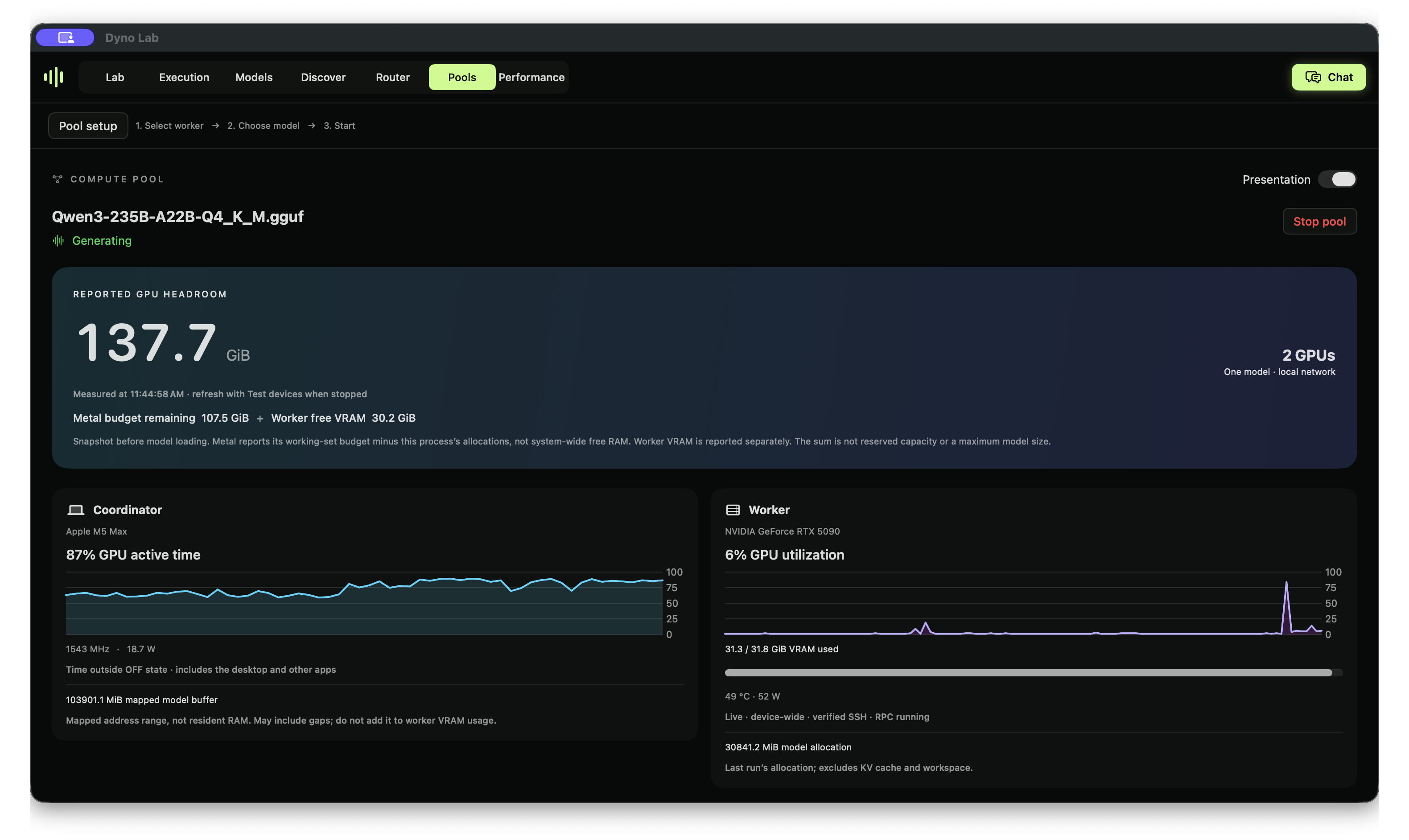
Run Lab experiments on this pool, including interventions, causal patching, probes and SAEs. The guide includes actual large-model results and the test limitations.
Troubleshooting
| Symptom | Next step |
|---|---|
| No workers found | Open the pairing window; check both selected adapters and subnet; avoid guest/client-isolated Wi-Fi |
| SSH host key changed | Verify the native SSH endpoint; retain strict checking and the saved key |
| RPC discovery fails | Start the worker; confirm loopback 50052, TCP and compatible runtime revision |
| Telemetry unavailable | Upgrade the existing key with the worker's telemetry control, then reconnect the pool |
| Download missing from library | Check Downloads; partial or unprepared shards are not usable models |
| Pool fails while loading | Inspect actual allocation logs, available RAM/VRAM and context; try a smaller quantization |
| Charts move without generation | Device-wide metrics include other applications; check request activity and model buffers |
With experimental research runtime v2, Lab supports pooled activation capture, interventions, causal patching, probes and SAE experiments. LLM weights stay pooled; probe and SAE fitting runs on the coordinator. See pool research for setup, validation and limits.
Development Lab capture
The development runtime supports bounded pooled activation norms. See pool Lab capture for setup, API limits and validation. Research runtime v2 adds pooled interventions/causal patching and probe/SAE training from captured vectors.